
SMS Communications Policy
Effective May 20, 2026 · Last updated September 15, 2026
Visilence LLC (“Visilence,” “we”) operates back-office software for small service businesses. Our platform sends text messages on behalf of those businesses to their customers. This page explains when we send SMS, what to expect, and how to opt out.
What messages we send
Visilence sends transactional SMS messages on behalf of small service businesses (our customers) to their end customers. Message types include:
- Appointment confirmations and reminders when a job is scheduled, rescheduled, or upcoming.
- Payment receipts after an invoice is paid.
- Review requests after service is completed.
- Service notifications from the business owner — for example, snow-day or sick-day cancellations.
We do not send marketing or promotional messages. All messages are transactional and tied to a specific service interaction between you and the business that has your information.
How consent is obtained
No text message is sent to a number until the person holding that phone has agreed from the phone itself. A phone number a business types into its records is not consent. There are exactly two ways to opt in, and both are recorded with the date, the wording agreed to, and the device that agreed:
1. You verify your number in your customer portal
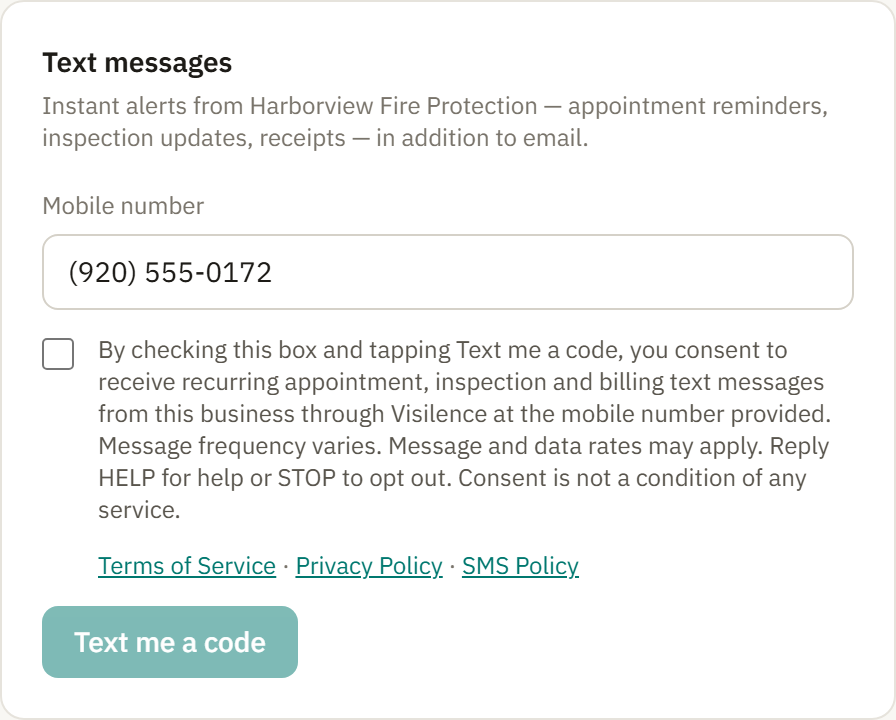
Sign in to your customer portal (the business gives you access), open Communication preferences, enter your mobile number under Text messages, tick the consent box, and tap Text me a code. The box is unchecked until you tick it, and its label reads:
By checking this box and tapping Text me a code, you consent to receive recurring appointment, inspection and billing text messages from this business through Visilence at the mobile number provided. Message frequency varies. Message and data rates may apply. Reply HELP for help or STOP to opt out. Consent is not a condition of any service.
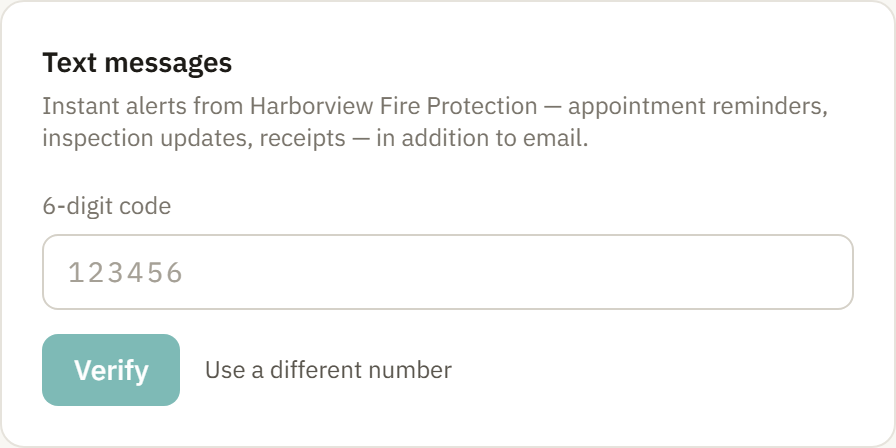
Beside the box are links to our Terms of Service, Privacy Policy and this page. We then text a one-time six-digit code to that number. Typing the code back completes the consent — nothing is sent to you until it matches. You can turn texts off on the same page with one tap at any time.
2. The business invites you, and you reply YES
A business can send one invitation text to a number on file. It reads:
[Business name] would like to text you appointment reminders, inspection updates and receipts through Visilence. Reply YES to opt in. Msg & data rates may apply. Reply STOP to decline, HELP for help.
Nothing else is sent unless you reply YES. When you do, you receive one confirmation naming the business, and texts are on. Not replying, or replying STOP, means you never hear from that number again.
Consent is never a condition of service. You can be a customer of any business on Visilence, use your customer portal, and receive everything by email without ever agreeing to texts. The one exception to the rule above is a code you request yourself: the portal offers Text me a code as a sign-in method, and that single code goes only to a number you previously verified.
Each business that uses Visilence is bound by our Terms of Service to use these flows and no others; the platform enforces it — a message to an unverified number is refused before it reaches the carrier.
Message frequency
Message frequency varies based on the services scheduled with the business and the events tied to those services. A typical service interaction generates 1–5 messages (e.g., confirmation when booked, reminder day-of, payment receipt after the job, optional review request).
We do not bulk-message or drip-message recipients outside the context of an active service engagement.
Carrier and data rates
Message and data rates may apply. Standard carrier rates for text messages and data usage apply to all messages sent and received. Check with your mobile carrier for details.
How to opt out
Reply STOP to any message from us to immediately unsubscribe from further messages from the number that sent it — for every business that texts you through Visilence. You will receive one final confirmation message acknowledging your opt-out.
The keywords STOP, UNSUBSCRIBE, CANCEL, END, and QUIT all trigger the same opt-out.
To re-subscribe after opting out, contact the business that originally added your number, or reply START to a previous message thread.
How to get help
Reply HELP to any message to receive contact information for support, or email us directly at support@visilence.com.
Privacy of your phone number
We do not sell phone numbers and we do not share them with third parties for marketing, advertising, lead generation, or any commercial purpose unrelated to operating Visilence.
No mobile information, including phone numbers, will be shared with third parties or affiliates for marketing or promotional purposes. Information sharing to subcontractors in support services, such as customer service and message transport (Twilio), is permitted; all other use case categories exclude text messaging originator opt-in data and consent.
Full details on how we handle personal information, including phone numbers, are in our Privacy Policy.
Operator
Messages are sent by Visilence LLC on behalf of the small business that holds your information. Operator details, message delivery, and complaints:
Visilence LLC
support@visilence.com
www.visilence.com